
Download the WBS template and work-package dictionary
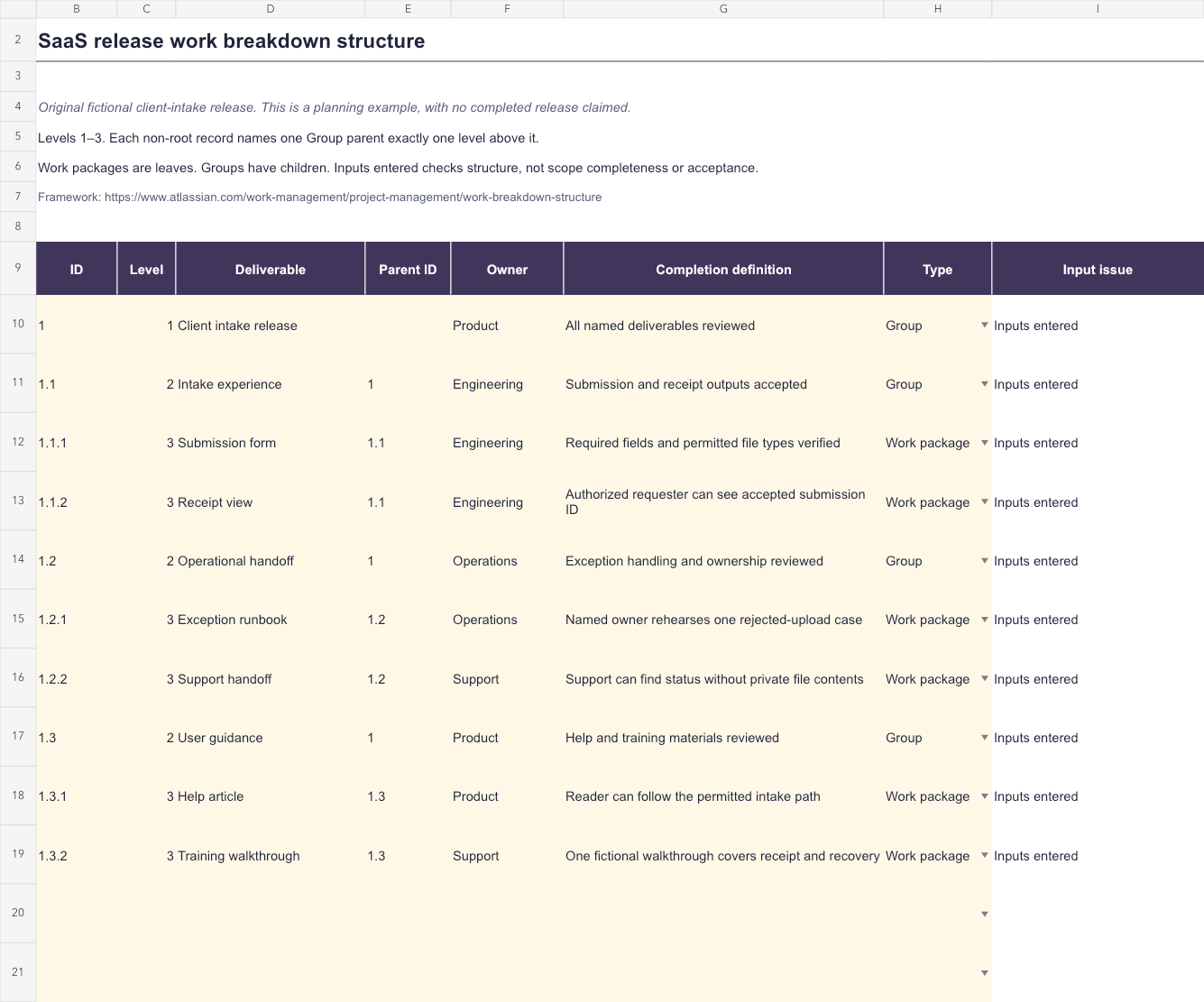
The Excel workbook includes a Release example sheet and a blank Your WBS sheet. It provides twelve prepared records, three numeric levels, parent relationships, Group or Work package types, and formula checks for missing or inconsistent inputs.
The text download adds an original example hierarchy, a completed work-package dictionary entry, and a blank dictionary form. Both files use a fictional BriefRelay client-intake release. No deliverable is represented as implemented, verified, or accepted.
Download without registration and start from an agreed scope. A workbook can check relationships between records, but the team must decide whether the named outputs cover the intended project.
What is a work breakdown structure?
A work breakdown structure organizes a project's work hierarchically, moving from the overall outcome through deliverables to manageable work packages. Atlassian's guide describes that progressive decomposition as a way to make the scope easier to plan and coordinate.
For a small SaaS release, the root might be client intake release. Its major deliverables could include the intake experience, operational handoff, and user guidance. Each branch then identifies the smaller outputs needed to complete that part.
Choose labels that make the output visible. Receipt view and exception runbook tell a reviewer what should exist. A broad activity such as work on intake gives less help when deciding whether the scope is complete.
Begin with the approved delivery boundary
The fictional release lets a permitted client submit a brief and obtain a scoped receipt. It also includes support recovery and user guidance. Payments, a new identity provider, and a custom CRM are outside that exercise's boundary.
Read the project charter and detailed scope of work before decomposing the release. If people disagree about the intended output, a more elaborate tree will not resolve that decision.
Name the root as the overall bounded deliverable. Then identify major branches that collectively cover it. Ask where product behavior, operational readiness, guidance, migration, or other agreed outcomes belong. Include only the ones actually required for the project.
Review boundaries between branches. If both the support handoff and training walkthrough claim the same document, assign that output once and link to it from the other context. Duplicate labels can otherwise hide duplicate planning.
Break deliverables into useful work packages
BriefRelay's intake experience contains a submission form and a receipt view. Operational handoff contains an exception runbook and support handoff. User guidance contains a help article and training walkthrough. The six leaves are the example's work packages.
Stop decomposing when the package has an accountable owner, a clear output, a boundary, and an assessable completion definition. The correct size depends on the team and decision; this template does not impose a universal duration or cost.
The dictionary entry for receipt view states what is included, what is excluded, required inputs, a proposed reviewer, and the expected observation. An authorized requester should see its accepted reference, while an unrelated workspace should not retrieve that receipt.
Keep uncertainty visible. If the team cannot name the acceptance observation or a required input, record the open question before presenting the package as ready for implementation.
| Parent group | Work package | Completion question |
|---|---|---|
| Intake experience | Submission form | Are required fields and permitted file types verified? |
| Intake experience | Receipt view | Can the authorized requester see its own accepted reference? |
| Operational handoff | Exception runbook | Can the named owner rehearse the rejected-upload path? |
| User guidance | Help article | Can a reader follow the permitted intake workflow? |
Use the workbook's parent and level rules
Enter records in rows 10–21. Columns B–H hold ID, numeric level, deliverable, parent ID, owner, completion definition, and type. Column I reports an input issue or Inputs entered. Keep the issue formulas intact.
The prepared model uses root ID 1 at level 1, type Group, with no parent. Every non-root item needs one unique Group parent exactly one numeric level above it. A Group needs children; a Work package is a leaf and cannot own child records.
IDs are stored as identifiers. The dotted spelling is a readable convention, but the formula uses the explicit Parent ID and Level fields rather than deriving ancestry from punctuation. Keep those fields consistent when moving or renaming records.
The bounded three-level rule prevents a valid cycle because every child must be at a higher numeric level than its parent. It also means level 3 must be a work package. A deeper project needs an intentionally extended model, not just a level-4 entry.
Connect the WBS to ownership, scheduling, and evidence
Use the package ID as a stable reference in tasks, test plans, and acceptance records. Its completion definition can guide the cases the team needs to execute, but it should not be rewritten as a claim that those checks already passed.
The Gantt chart template supplies dates and dependency planning. A WBS identifies the work to organize; a schedule then decides when and in what order that work can happen.
The RACI matrix can describe wider execution, approval, consultation, and communication roles. The single Owner field here keeps the work package accountable without trying to replace that broader responsibility model.
If estimating time or cost elsewhere, avoid adding both a group's estimate and its children's estimates into the same total. This workbook deliberately provides no time or cost aggregation, so there is no invented roll-up or progress percentage.
Review completeness and change the hierarchy deliberately
Walk through each agreed deliverable and identify its package or branch. Then review each work package for duplication, missing inputs, and acceptance gaps. A structurally valid tree can still omit necessary work or describe the wrong output.
When scope changes, record the decision and affected IDs. A request to add CRM synchronization may introduce a new branch, integration contract, support responsibility, and verification work. Do not hide it inside an existing leaf merely to keep the diagram small.
Sort whole records together if reordering the sheet. Parent records may appear after children because the formulas use bounded ID relationships rather than the preceding row. The hierarchy still needs to be understandable to a human reader.
The prepared area ends at row 21. Extending it requires updating the row formulas, all bounded ID/parent/level/type ranges, validation, and conditional formatting. Review those references before relying on an added record.
How the template was checked
The workbook checks duplicate IDs, missing parents, parent levels, Group requirements, ownership, and completion definitions. Boundary exercises include a self-parent, a parent at the wrong level, a work package used as a parent, and a cycle attempt.
The example contains ten valid records and six work packages. Checks also reversed the record order and populated the last prepared row of the blank sheet with a valid relationship to its root. Input issues remained visible when required fields were removed.
Both sheets were rendered, inspected, exported, and reimported with recalculation. Microsoft Excel was unavailable for a native application test. Those checks verify the stated workbook rules, not the semantic completeness or actual acceptance of a project.
Sources and original exercise checked October 28, 2026. Use the hierarchy to make the agreed outputs and their boundaries easier to review before committing the delivery work.