
Download the Excel Gantt chart template
The workbook contains a completed fictional release on the Release example sheet and an empty Your plan sheet. Both use the same structure: task ID, task, owner, start date, end date, calculated duration, dependency notes, a date issue column, and a twenty-eight-day timeline. No account or email address is required to download it.
Use it for a bounded piece of delivery work, such as preparing and piloting a report export. The example dates and responsibilities are illustrative. They are not a ShowMeYourSaaS delivery commitment or a recommended estimate for your project. Save a copy before entering your own plan.
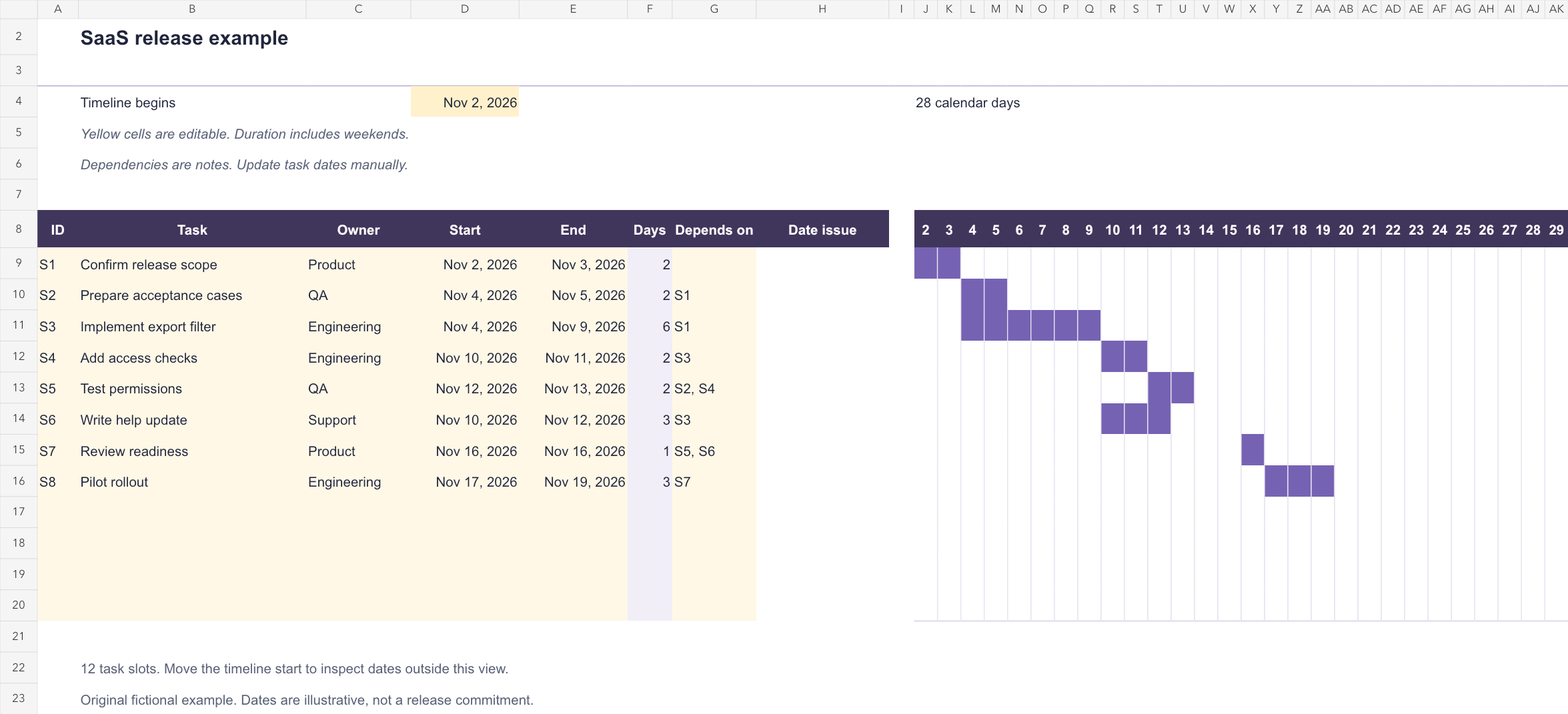
What a Gantt chart helps you see
A Gantt chart connects a task list to time. Each horizontal bar runs from a task's start through its end. Rows that overlap may need people or systems at the same time; a later task may have to wait for an earlier result. This makes a schedule easier to discuss than a list with one final deadline.
Microsoft documents creating a Gantt-style presentation in Excel with a stacked bar chart. Our template uses date cells and conditional formatting instead. That keeps the schedule directly editable in a small table and avoids requiring you to rebuild a chart whenever you change one of the prepared rows.
Choose this view when coordination depends on dates. A product roadmap explains direction and intended outcomes. A Kanban board shows work moving through states. A Gantt chart answers the narrower question: given our current assumptions, when will these tasks happen?
Enter your release plan in five steps
Open Your plan and change D4, labelled Timeline begins, to the first date you want to see. The twenty-eight date columns update from that cell. The header shows day numbers; D4 establishes the month and year. Moving the view changes the visible dates, not the task dates.
Use rows 9–20 for up to twelve tasks. Fill the yellow input cells with an ID, a specific result, an accountable owner, and actual spreadsheet dates in Start and End. Keep the task name concrete: Test permissions tells a reader more than QA. A person may own several tasks, but their overlapping bars still need a capacity review.
Read the Date issue column before relying on a bar. A named task with a missing date prompts Enter both dates. An end before the start produces End before start. Correct the inputs instead of overwriting the duration formula. Keep the calculated Days column and timeline cells intact.
- Copy the workbook and retain the completed sheet as a reference.
- Set the timeline start in D4 and enter tasks in the prepared twelve rows.
- Enter start and end dates as dates, rather than text labels such as next Monday.
- Record prerequisite task IDs in Depends on, then check their dates manually.
- Review the schedule with the owners and record the next review date outside the template.
Understand the date and dependency rules
Duration counts inclusive calendar days. A task starting November 2 and ending November 3 occupies two days. Starting and ending on November 16 occupies one day. Weekends and holidays remain in the count; this workbook does not calculate working-day capacity.
Depends on is a note field. Entering S3 does not move a task, draw an arrow, detect a cycle, or calculate a critical path. If S3 slips, review each dependent row and change its dates yourself. Do not assume that a visually plausible bar proves the prerequisite has been met.
A task outside the twenty-eight-day view can have a valid duration without a visible bar. Move D4 to inspect it. The prepared range contains twelve slots; inserting extra rows or extending the horizon requires updating formulas and formatting and checking the result. For a larger dependency network, choose a scheduling tool that explicitly supports those requirements.
Read the completed SaaS release example
The fictional release adds a filtered export. Product first confirms scope. QA prepares acceptance cases while engineering implements the filter. Access checks follow implementation, and permission testing follows both the cases and access checks. Support can draft help material while the final checks are being prepared.
The readiness review on November 16 is a one-day checkpoint, represented by a single filled cell rather than a special milestone symbol. It depends on permissions testing and the help update. The pilot begins on November 17 only if the review supports proceeding. The workbook does not make that decision automatically.
Notice that overlapping bars do not establish available capacity. In a solo business, the same person might be Engineering, QA, and Support. Rewrite the dates around that person's actual time. Use the weekly schedule guide when support and customer conversations must share the calendar with delivery.
| Schedule detail | Review question |
|---|---|
| Acceptance cases overlap implementation | Can QA work from agreed behavior, or is scope still changing? |
| Help writing overlaps access checks | Can the workflow be documented before permission behavior is settled? |
| Readiness review precedes pilot | Who can stop the release if a required check fails? |
| Pilot spans three calendar days | Who will observe it and respond during that period? |
Make completion and release decisions explicit
A bar ending on Friday is a planning assumption. Define what must be true for the task to be complete: reviewed code, a passing permission test, an approved help article, or another inspectable result. Put detailed behavior in a product requirements document rather than hiding it in a tiny task label.
At each review, update dates to reflect what you know and preserve an earlier copy if you need to explain a change. Separate an estimate from an external commitment. If a dependency remains unresolved, show the uncertainty and decide whether to narrow scope, move the release, or investigate first.
Before opening a pilot, confirm who owns the rollout, what observations they will check, and how they will stop it. A schedule supports that conversation; a filled timeline alone cannot establish that a release is ready.
How the template was checked
We checked the original example's eight task durations against its filled timeline cells, changed a task's end date, tested a missing date and an end before the start, moved the visible timeline, and used the last blank task slot. Both sheets were rendered for inspection, and the exported XLSX was imported again to check the calculated durations.
These checks used the spreadsheet generation and calculation tools available to us. Native Microsoft Excel was unavailable, so this is not a claim of testing in the Excel application. When you open the workbook in your spreadsheet software, confirm that changing a start or end date recalculates Days and the timeline before depending on your own schedule. Sources and template checked October 27, 2026.