
Download the Excel risk register template
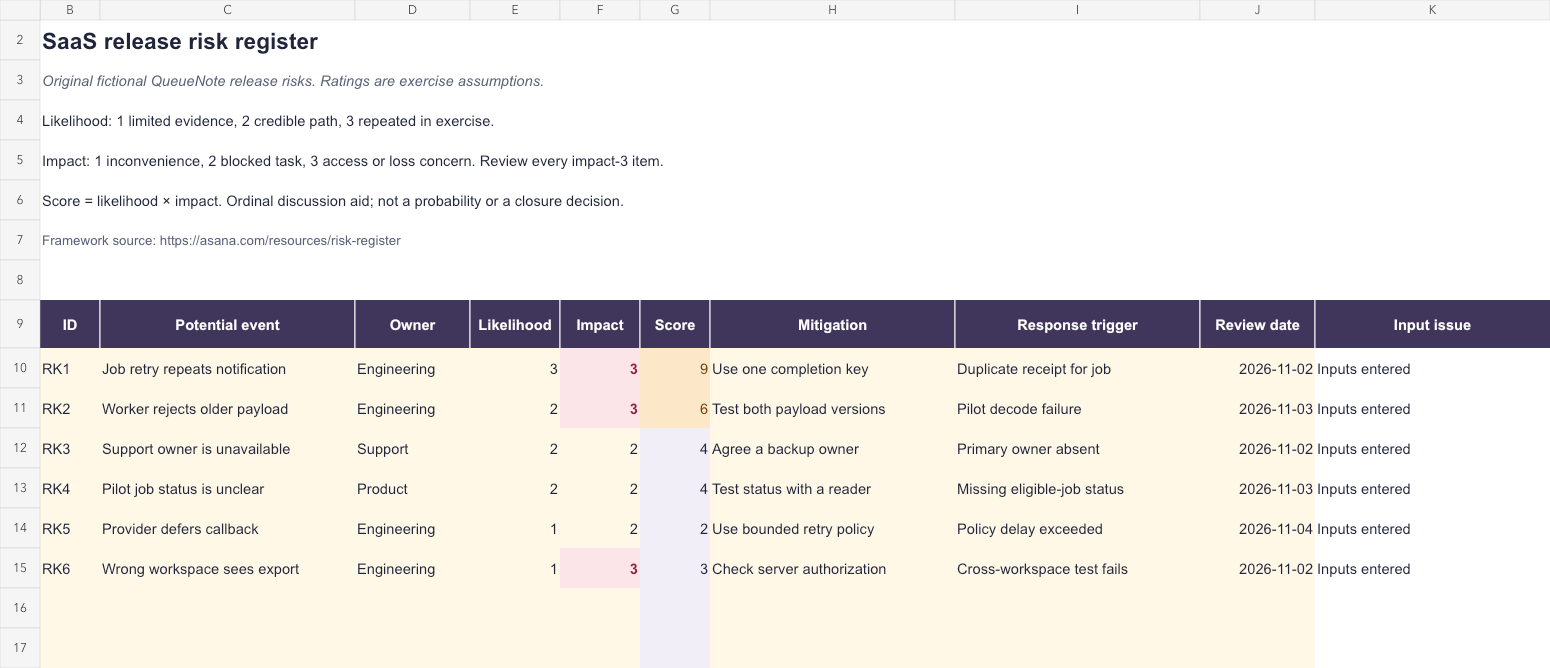
The workbook contains a Release example sheet with six original fictional risks and a Your register sheet with eight prepared risk slots. It calculates likelihood-times-impact scores and flags missing or invalid inputs. No registration is required to download it.
The example concerns a background-export release in a fictional SaaS called QueueNote. Its ratings and response ideas are exercise assumptions, not observed probabilities, actual security findings, or descriptions of ShowMeYourSaaS systems.
Save your own copy and agree the assessment scale with the people involved before replacing the example. The workbook supports a planning conversation; a filled row does not prove a mitigation was implemented or a risk was accepted.
What belongs in a risk register?
A risk register tracks possible events that could affect a project or service. Asana's guidance describes fields such as risk description, likelihood, impact, ownership, and response planning. A register becomes useful when it connects a concern to a person and a next decision.
Write a potential event and its consequence. Job retry repeats a completion notification is more actionable than reliability risk. It gives the team a failure path to investigate and a specific behavior to verify.
Distinguish a risk from an issue already occurring. A possible cross-workspace export is a risk to prevent. Evidence that one happened calls for the relevant incident process and investigation, rather than leaving it as a low-priority planning row.
Use the example scale consistently
The workbook uses a deliberately simple ordinal scale from 1 to 3. Likelihood 1 means limited evidence for the concern, 2 a credible path, and 3 repetition in the exercise. These labels organize the fictional review; they are not numerical probabilities and do not imply a calibrated real-world frequency.
Impact 1 means inconvenience, 2 a blocked task, and 3 an access or loss concern. The highest impact deserves review regardless of the product of the two ratings. The sheet highlights impact 3 separately so multiplication cannot hide it behind a low likelihood estimate.
Agree more precise definitions that fit your service before operational use. Explain what evidence changed a rating, and preserve uncertainty rather than using zero for unknown. A risk score can order discussion under an agreed convention; it cannot establish that a release is safe.
| Field | Example meaning | Limit |
|---|---|---|
| Likelihood 1–3 | Evidence-based discussion category | Not a measured probability |
| Impact 1–3 | Consequence category for this exercise | Not a universal severity standard |
| Score 1–9 | Likelihood multiplied by impact | Does not decide acceptance or closure |
| Impact 3 highlight | Review access or loss concerns | Applies even when score is 3 |
Fill the blank register
Open Your register and use rows 10–17. Enter a unique ID in column B, a potential event in C, an owner in D, and integer ratings in E and F. The score appears in G when both ratings are valid. Enter mitigation, response trigger, and a real spreadsheet date in H, I, and J.
Column K identifies missing event names, IDs, owners, rating inputs, mitigations, response triggers, or review dates. Duplicate IDs are flagged because they make a review reference ambiguous. Keep the calculated columns G and K intact.
Inputs entered means the required fields satisfy the workbook's local rules. It does not mean the owner has agreed, the response is workable, or the risk has been reviewed. Keep the decision and verification evidence in the task or record linked to that risk ID.
The prepared area ends at row 17. Extend formulas, validation, and conditional formatting if you add more records. Keep each whole row together when sorting, including its owner, plans, and review date.
Read the six fictional release risks
The first example concerns a retry that repeats a completion notification. Its proposed mitigation is one logical completion key, and its trigger is a duplicate receipt for the same job. The team still needs to verify the actual side-effect behavior rather than treating the short mitigation label as an implementation.
A second risk concerns older payloads reaching a new worker. A version-contract test is the proposed preparation; a pilot decode failure is a response trigger. Another row records an unavailable support owner, showing that a release risk can concern a handoff as well as code.
The cross-workspace export concern has likelihood 1 and impact 3, giving a score of 3. It remains highlighted for its consequence. A lower combined score is not a reason to waive an authorization check or treat an access concern as acceptable.
Use acceptance criteria to define what a prevention check must establish, and an RACI matrix when the role owning a response is unclear.
Separate mitigation from the response trigger
Mitigation is what you do to reduce the likelihood or consequence before the event. A response trigger describes the observation that starts a prepared action or escalation. Writing monitor it in both fields leaves the operator without a useful boundary.
For a delayed callback, bounded retries may be part of mitigation, while a delay beyond the actual service policy starts investigation. The workbook uses a short policy-delay label because the appropriate duration depends on the real operation. Do not copy an arbitrary threshold into your production process.
A response can depend on another procedure. Link a risk ID to a tested SOP or an incident response plan so the owner can find authorized steps, evidence requirements, and escalation.
Review risks when evidence changes
Review before a commitment, after a relevant test, when ownership changes, or when a trigger occurs. A calendar date helps schedule attention but does not replace these event-driven reviews. Record who made the current decision and which evidence they used.
A SWOT analysis looks at strategic internal and external conditions. The register follows specific potential events and their response over time. Use the narrower record when the team needs to know who will investigate a particular release failure.
Do not delete a risk merely because a mitigation task closed. Verify the intended effect, reassess remaining exposure, and record the decision. A register can retain a history even when the current working view changes.
How the workbook was checked
We checked the six example scores, missing ratings, zero and fractional ratings, nonnumeric text, missing ownership, a missing response trigger, a text date, duplicate IDs, and the last prepared blank row. Both sheets and an invalid-input view were rendered for inspection.
The exported XLSX was imported again to check the example results and blank score cells. Native Microsoft Excel was unavailable. Open the file in your spreadsheet application and change a rating to confirm recalculation before relying on your own register.
Source and workbook checked October 28, 2026. The file provides calculation and completeness checks; decisions about your service still depend on actual evidence and authority.