
Download the decision matrix template
The Excel workbook contains a Tool example sheet and a Your comparison sheet. Each supports four criteria, three options, editable weights and ratings, an eligibility decision, calculated scores, and ranks. The accompanying CSV records the fictional evidence behind the example ratings.
Option A, B, and C are synthetic alternatives, not disguised reviews of real products. Their capabilities, ratings, and eligibility assumptions are invented for the exercise. The files are available without registration.
Use the workbook for one defined choice. Save a copy, replace the criteria and options, and retain a record of why each rating was assigned. A precise score can still rest on weak evidence.
What is a decision matrix?
A decision matrix puts alternatives and evaluation criteria in a shared table. A weighted version gives some criteria more influence than others. Asana's guidance describes this approach and emphasizes that the result depends on the chosen criteria, evidence, and judgments.
This is useful when options can be compared against the same requirements. It is less useful when the real question is whether to begin the project at all or when one mandatory requirement eliminates every option.
The RICE framework uses reach, impact, confidence, and effort to compare initiatives. This workbook supports decision-specific criteria for choosing between tools. Do not combine the raw scores from the two models as if they measured the same thing.
Define the choice and hard requirements first
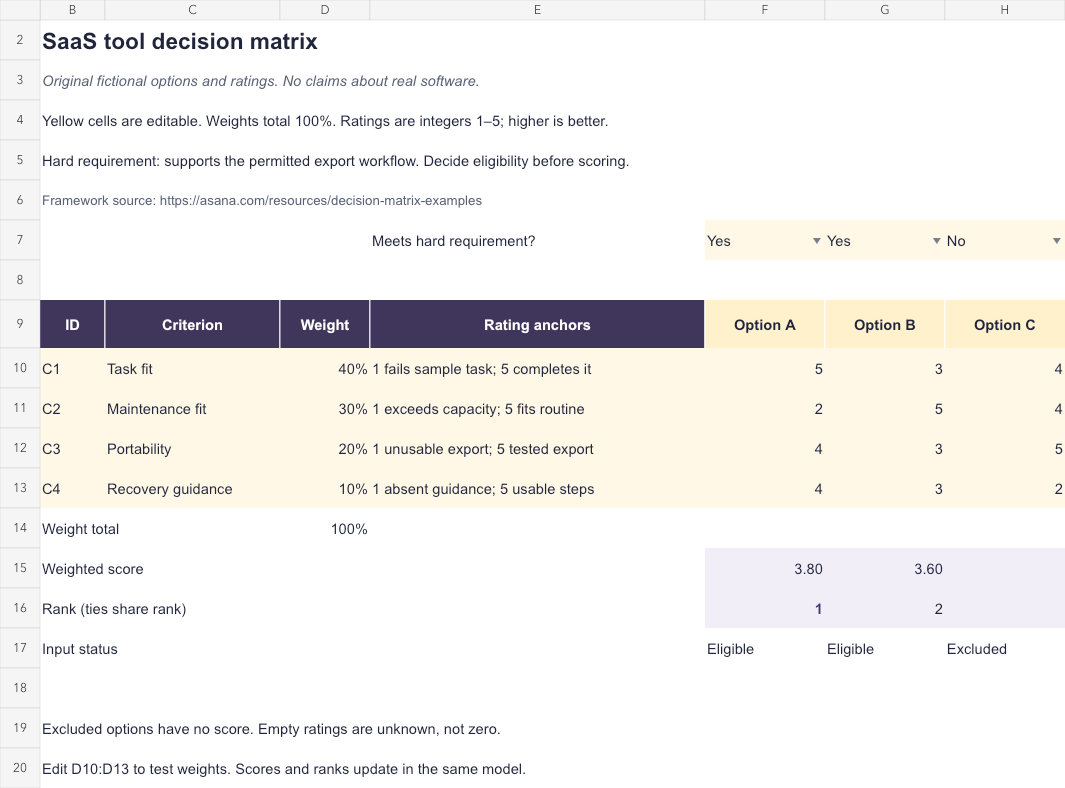
The fictional team is selecting a tool for an authorized export workflow. Its hard requirement is support for that permitted workflow. In the example, A and B meet it; C does not. Eligibility is entered explicitly in F7:H7 before a score is used.
A mandatory requirement should not become a small weight that a strong rating elsewhere can offset. If an option cannot meet the required access or export boundary, exclude it from this comparison or change the requirement through an actual decision.
The workbook accepts Yes or No for the eligibility entries. It cannot inspect a vendor, verify a contract, or establish permission. Keep the source and reviewer for the eligibility decision in the evidence register.
Choose criteria and rating anchors
The example compares task fit, maintenance fit, portability, and recovery guidance. Each has a short description of the low and high rating anchors. Ratings are integers from 1 to 5, with higher consistently meaning a better fit for the stated decision.
Agree what intermediate values mean for your own comparison. A rating of 3 should not mean average market performance for one reviewer and untested for another. Unknown evidence stays unresolved; it should not become a convenient middle score.
Keep criteria distinct. If maintenance fit and operating effort describe the same burden, weighting both can count that concern twice. The tool-selection guide helps identify the workflow and capacity that the comparison should serve.
The CSV gives each synthetic rating an evidence note and an explicit fictional label. Replace those with current, permitted observations if comparing real products, and preserve any limitations of the trial.
Calculate the completed example
The baseline weights are 40% for task fit, 30% for maintenance fit, 20% for portability, and 10% for recovery guidance. Option A's ratings are 5, 2, 4, and 4. Its weighted score is 3.80: (0.4 × 5) + (0.3 × 2) + (0.2 × 4) + (0.1 × 4).
Option B scores 3.60 using ratings 3, 5, 3, and 3. A therefore has rank 1 and B rank 2 under the baseline assumptions. C has no calculated score or rank because its eligibility is No.
These results identify the leading eligible option in the entered model. They do not establish that A is objectively best, that its evidence is complete, or that a purchase has been authorized.
| Criterion | Weight | A | B | C |
|---|---|---|---|---|
| Task fit | 40% | 5 | 3 | 4 |
| Maintenance fit | 30% | 2 | 5 | 4 |
| Portability | 20% | 4 | 3 | 5 |
| Recovery guidance | 10% | 4 | 3 | 2 |
| Result | 100% | 3.80; rank 1 | 3.60; rank 2 | Excluded |
Use the blank workbook and read its checks
Open Your comparison. Name the three options in F9:H9 and record eligibility in F7:H7. Enter four unique criterion IDs and names in B10:C13, weights in D10:D13, rating anchors in E10:E13, and ratings in F10:H13.
Enter weights as percentages or decimal fractions, such as 40% or 0.4. They must be numeric, between zero and one, and total 100% within the workbook's small rounding tolerance. A zero weight is allowed, but all four prepared criteria still require names and ratings under this template's completeness rule.
Rows 15–17 show weighted scores, ranks, and input status. Missing ratings, invalid scales, duplicate criterion IDs, or incomplete weights prevent a score for an otherwise eligible option. Excluded options remain unscored. Ties share a rank.
The prepared model is four criteria and three options. If you add rows or columns, extend and review formulas, validation, and rank ranges. The blank template does not automatically discover additional criteria or vendors.
Test sensitivity before committing to the result
Change the weights to 10%, 50%, 30%, and 10% in D10:D13. The same calculation now gives A 3.10 and B 4.00, reversing the ranking. This scenario represents a team placing more importance on maintenance fit and portability.
The reversal shows that the decision depends on priorities, not merely arithmetic. Discuss why the alternative weights might be appropriate and what evidence could change a rating. Keep the baseline record before editing, then restore it if it remains the agreed comparison.
If small plausible changes repeatedly reverse the order, investigate the uncertain criteria or consider a bounded trial. A tie or unstable result can be useful information rather than a reason to add more decimal places.
Verify the decision and maintain the evidence
Record the chosen option, the actual decision owner, tradeoffs, unresolved conditions, and a review trigger. A score is an input to that decision. It does not replace verification of current product facts, pricing, access, or contractual requirements.
We checked baseline scores, a ranking reversal, missing and zero ratings, invalid weight totals, eligibility changes, ties, and duplicate IDs. Both sheets and an invalid-input view were inspected, then the XLSX was exported and imported again to compare the results.
Native Microsoft Excel was unavailable. Confirm recalculation in your spreadsheet application by changing a weight or rating. Source, workbook, and original fictional evidence checked October 28, 2026.