
Download the Excel gap analysis template
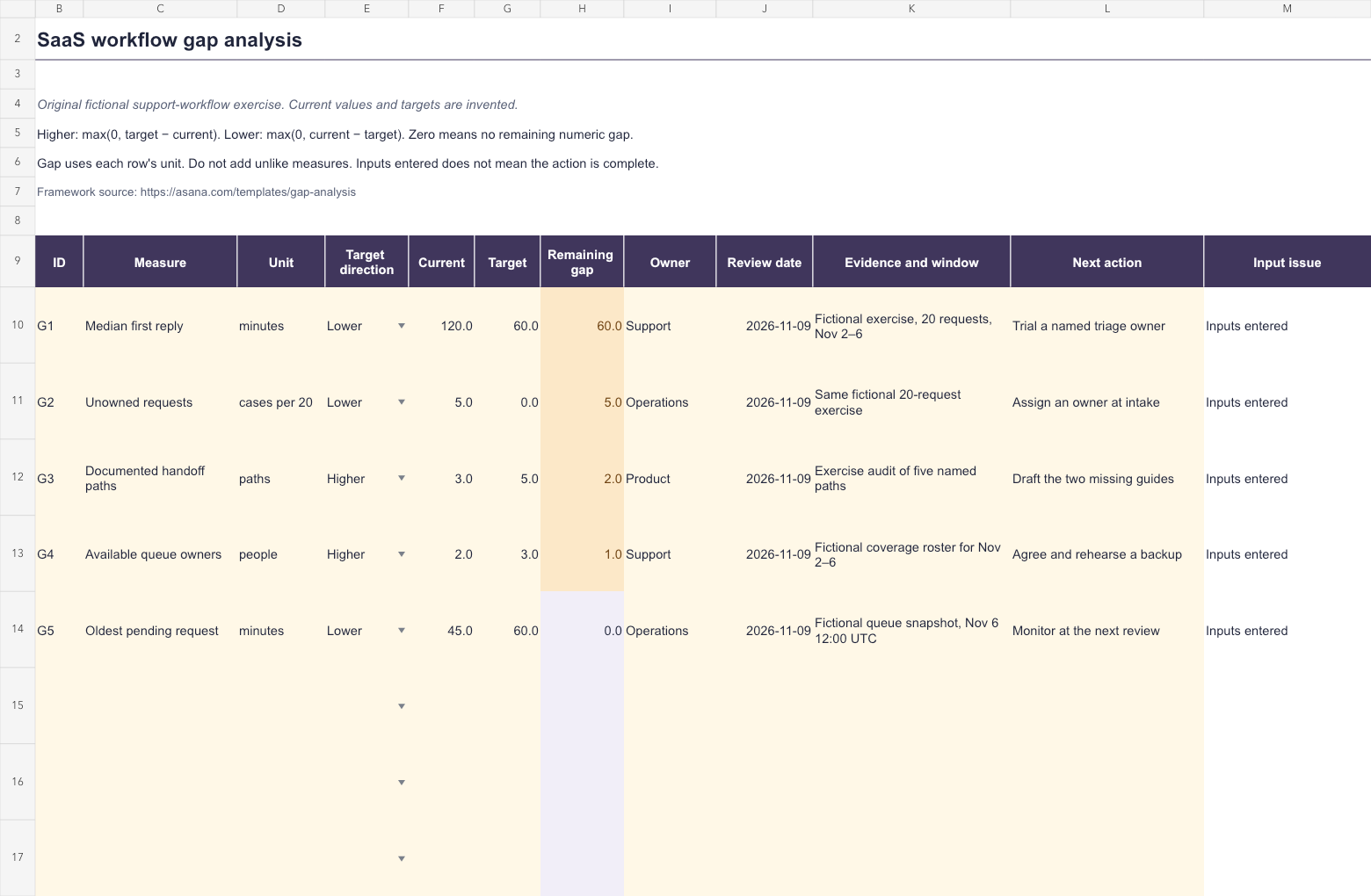
The workbook includes a Workflow example sheet with five original fictional measures and a Your gap analysis sheet with eight prepared rows. Yellow cells hold inputs, the remaining gap is calculated, and input issues appear beside the record.
The example concerns BriefRelay's fictional support workflow. Its current values, targets, roster, and November exercise window are invented teaching material. They are not observations about ShowMeYourSaaS, research findings, or industry benchmarks.
Download the workbook without registration, save a copy, and replace the measures with ones that describe a decision your team needs to make. Use matching units, populations, and measurement rules for each current-versus-target comparison.
What is a gap analysis?
A gap analysis examines the difference between a current condition and a desired condition. Asana's framework connects the comparison to scope, evidence, actions, ownership, and follow-up. The output should make the next decision clearer.
For a SaaS team, the scope could be a support handoff, an onboarding path, a release capability, or a documented operating process. A narrow question such as which handoff paths lack usable guidance is easier to investigate than how can the company improve everything.
The comparison can include qualitative evidence as well as numbers. The downloadable workbook focuses on nonnegative numeric measures. Keep a separate explanation when the important gap is an unresolved decision or an observation that cannot sensibly be reduced to a number.
Choose a current state that the evidence supports
BriefRelay's example begins with a synthetic set of twenty support requests. The exercise assigns a median first reply of 120 minutes and five unowned requests. Other rows describe documented paths, available owners, and one queue snapshot.
These measures describe different things. A request-count measure needs the relevant population; a median needs a defined start and stop; a snapshot needs its observation time. The evidence-and-window column keeps those limits visible beside the current value.
Before using a real measure, decide how it is collected. Does first reply include an automated receipt or a substantive response? Are waiting periods included? Which requests belong in the denominator? A target comparison is difficult to interpret if those rules change halfway through.
Use references to permitted evidence rather than copying private support conversations into a shared sheet. Mark an unavailable observation as missing. Entering zero would assert something different: that the measured amount was actually zero.
Set a target with a direction and a reason
The fictional first-reply target is at most 60 minutes, so the direction is Lower. The documented-path target is at least five paths, so the direction is Higher. The workbook needs that distinction to calculate the remaining difference correctly.
Targets should come from a service need, an agreed commitment, a capacity decision, or another explicit reason. The numbers in this workbook illustrate the calculation only. They do not establish what a small SaaS should promise its customers.
For a Higher target, the formula is max(0, target minus current). For a Lower target, it is max(0, current minus target). The result is zero once that numeric threshold is satisfied; the sheet does not create a negative gap to suggest surplus progress.
If the requirement is a range or a specific exact value, this two-direction model is not the right rule by itself. Adapt the measurement design before treating its output as a decision.
| Measure | Current → target | Remaining difference |
|---|---|---|
| Median first reply, Lower | 120 → 60 minutes | 60 minutes |
| Unowned requests, Lower | 5 → 0 cases per 20 | 5 cases in that population |
| Documented paths, Higher | 3 → 5 paths | 2 paths |
| Available queue owners, Higher | 2 → 3 people | 1 person |
| Oldest pending request, Lower | 45 → 60 minutes | 0 minutes above the target |
Fill the blank worksheet
Use rows 10–17 on Your gap analysis. Enter ID, measure, unit, direction, current value, and target in columns B–G. The calculated remaining gap appears in H. Enter owner, review date, evidence and window, and next action in I–L.
Column M flags missing or invalid input. Current and target must be numeric and nonnegative; zero is allowed. Choose Higher or Lower, use a unique ID, and enter a real spreadsheet date. Keep the calculated H and M columns intact.
Current, target, and remaining-gap values display one decimal place by default. Increase the number-format precision when the measure needs it, especially for small fractional differences. Display rounding does not change the stored calculation.
A valid numeric difference can remain visible while another field, such as owner, is missing. The issue column keeps that incomplete prerequisite explicit. Inputs entered means only that the local field rules are satisfied.
The prepared area stops at row 17. Extend formulas, bounded ID ranges, validation, and formatting before adding more records. If sorting, keep the whole record together so evidence, owner, and action remain attached to the correct measure.
Turn the difference into a testable next action
The example proposes a named triage owner for first replies and an owner-assignment step for unowned requests. These are ideas to evaluate, not outcomes already achieved. A lower observed reply time after a change would still need interpretation in its context.
Write the next observation before starting. For a new owner-assignment step, inspect the next agreed population for missing ownership and record exceptions. For two missing guides, review whether the relevant paths are documented and usable rather than merely counting new files.
Do not assume the gap reveals its cause. A slow reply could involve routing, unavailable staff, unclear ownership, or a different request mix. Use the root cause analysis guide when the decision requires causal investigation.
Keep different units separate. Sixty minutes, five cases, two paths, and one person cannot be added into a meaningful total. A prioritization decision also needs consequences, effort, dependencies, and uncertainty.
Review the analysis as the workflow changes
At the review date, collect the next observation using the agreed rules and record whether the target, action, or measurement needs revision. Preserve the previous evidence reference so the change remains traceable.
The zero-gap queue row still has a monitoring action. Meeting one threshold at one fictional snapshot does not establish that the broader process is complete. Likewise, a populated next-action field does not mean that action was implemented.
SWOT analysis can help frame strategic conditions. A gap analysis then narrows the comparison to a defined current and desired state. The product roadmap can coordinate work selected from that review without turning every visible gap into an immediate commitment.
How the workbook was checked
The example calculates remaining gaps of 60, 5, 2, 1, and 0 in their respective units. Checks changed the direction, supplied blank, zero, negative and text observations, removed an owner, entered a text date, duplicated an ID, reordered records, and populated the last prepared row.
Both example and blank sheets were rendered and inspected. The file was exported and reimported, and the formulas were recalculated to confirm the stated outputs. Conditional formatting highlights positive differences and input issues separately.
Microsoft Excel was not available for a native application test. The workbook's calculation, input, visual, and round-trip checks do not establish the behavior of every spreadsheet application.
Sources and original exercise checked October 28, 2026. Use the template to connect a clearly defined difference to an owned action and a useful follow-up observation.