
What is single sign-on?
Single sign-on lets users reach multiple applications through an established identity system rather than maintaining an independent sign-in experience for each app. Microsoft describes the identity provider as the party that verifies identity and confirms it to an assigned application.
A customer using a managed identity provider may want its staff to reach your SaaS through that system. The app still has to resolve the correct local account and customer workspace, establish its session, and evaluate the requested operation.
An existing identity-provider session may satisfy the next sign-in, or policy may require another authentication step. SSO should not be interpreted as a promise that a user will never see a sign-in prompt or additional factor again.
Download the SSO evaluation worksheet and rollout cases
The text resource provides an original fictional BriefRelay enterprise-customer scenario and a blank evaluation worksheet. The CSV contains six proposed rollout cases covering workspace binding, validation, denied sign-in, removal, recovery, and the pilot decision.
All cases are marked Not run. The resources and diagram are teaching and planning material; no real customer tenant, assertion, token, callback, account mapping, or identity-provider configuration was exercised.
Use them to prepare a discussion between the customer's identity owner, your application owner, and Support. The practical output should be a known integration path and owned decisions, not simply a checkbox that says SSO supported.
Follow the identity-provider-to-application journey
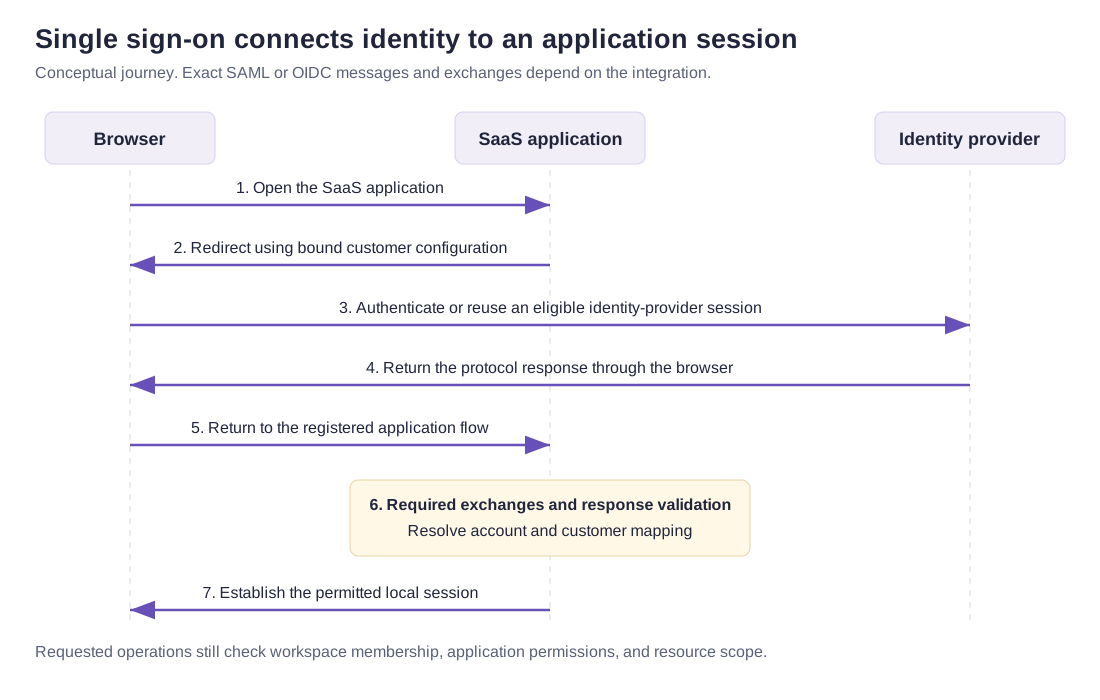
In the fictional scenario, an agency user opens BriefRelay. The app begins a transaction using the identity configuration bound to that customer workspace. The browser visits the identity provider, which evaluates the required authentication.
The protocol-specific response returns through the registered flow. A maintained integration performs the required exchange and validation. Only then does the application resolve the account relationship and establish the permitted local session.
The diagram is conceptual rather than a packet trace. SAML and OpenID Connect have different messages and validation requirements, and a code flow can involve an additional server exchange before identity information is accepted.
After sign-in, reading or changing a brief still requires the relevant workspace membership and application permission. Keep that operation-level decision connected to the resource being accessed.
Understand SAML and OpenID Connect
SAML 2.0 is an XML-based federation protocol commonly encountered in enterprise identity integrations. OpenID Connect, often shortened to OIDC, provides an identity layer on OAuth 2.0 and uses ID Tokens to convey authentication-related claims.
The OIDC specification defines claims and validation requirements for the intended client, including issuer, audience, expiry, and transaction-related protections where applicable. Receiving a token-shaped string or decoding its contents is not enough to establish a valid sign-in.
Choose a protocol by the customer's supported identity system, your maintained integration, required features, and the team's operational capacity. A familiar protocol name does not establish compatible configuration or a working account lifecycle.
Use current integration documentation for registration, callbacks, key handling, and validation. This article does not provide a homemade assertion parser or a replacement authentication server.
Separate SSO, OAuth, MFA, and RBAC
OAuth concerns delegated access to protected services. OIDC adds authentication-related behavior on top of OAuth 2.0. An access token issued for one API should not be repurposed as an unexamined sign-in credential for another application.
Multi-factor authentication concerns the authentication factors required by the relevant policy. SSO describes the broader sign-in experience across applications. Decide where the policy is enforced and what the app needs to know about the completed authentication.
Role-based access control concerns permitted actions. A user who has authenticated through the customer's identity provider does not automatically become an Owner of every workspace or gain the right to publish every brief.
In the BriefRelay exercise, identity establishes the person, account mapping connects that person to the intended local account, membership determines the customer workspace relationship, and the permission policy governs the action.
| Concept | Decision it supports |
|---|---|
| SSO | How can the user reach assigned apps through an identity system? |
| OIDC or SAML integration | How is the relevant authentication response exchanged and validated? |
| MFA policy | Which authentication factors are required and where? |
| Provisioning | How are application accounts created, updated, or removed? |
| Application authorization | May this principal perform this action on this scoped resource? |
Plan account mapping and provisioning
Decide how the validated external identity maps to an application account and customer workspace. Record the expected issuer, stable identity reference, existing-account linking policy, and who can resolve an ambiguous mapping.
Do not let an unverified submitted workspace ID or an email-looking field become sufficient evidence of that relationship. Use the actual protocol and integration's validated identity context, then apply the app's account and membership rules.
Provisioning has a separate lifecycle. Microsoft's app-provisioning documentation describes creation, maintenance, and removal of application identities and roles. SSO alone does not choose whether your app creates an account on first sign-in or requires it to exist beforehand.
The worksheet asks whether just-in-time creation is permitted, who approves new membership, and how updates and removals arrive. An unanswered lifecycle question remains unresolved even when an ordinary sign-in succeeds.
Examine local sessions, removal, and recovery
An identity-provider session and a local application session are distinct parts of the system. The OIDC specification also distinguishes ID Token expiry from session lifetime. Record what your chosen integration actually does when a user signs out or loses access.
Exercise removal while an app session is already open. Check the intended membership freshness at the protected operation and any behavior of cached identity data. A successful removal response elsewhere does not establish the exact timing of local access loss.
Name the recovery owner and permitted recovery path before a pilot. Consider an unavailable identity provider, a misconfigured customer connection, key or certificate changes, and an uncertain account mapping. The worksheet creates no recovery account and changes no authentication settings.
The Better Auth session guide and Clerk Organizations guide cover provider-specific integration concerns. Keep their actual session and organization behavior separate from this conceptual flow.
Use a bounded rollout and evidence record
Start with an approved test tenant and synthetic accounts. Record the protocol, integration version, customer binding, intended audience, callback configuration, identity mapping, and relevant session assumptions before assessing results.
Run ordinary sign-in and the consequential failure cases: denial, invalid response, wrong customer binding, changed membership, removal with an existing session, and unavailable-provider recovery. Use supported tooling and the chosen protocol's actual validation requirements.
Keep the case status, candidate configuration, observed result, evidence reference, owner, and unresolved conditions together. A sign-in screenshot supports one observation; it does not verify every callback, tenant-isolation, provisioning, logout, or recovery case.
The downloadable records were checked for consistent fictional labels and Not run statuses. No customer rollout or security certification is claimed. Sources and original exercise checked October 28, 2026.